
Test Automation Platform for Faster, Reliable Releases
QA Touch Automate combines no-code/low-code automation with intelligent assistance, helping QA teams build
and maintain reliable tests while staying in control.
Low Code Test Automation Platform Built for Testers by Testers
QA Touch Automate empowers teams move faster with reliable, no code test automation that is easy to adopt and simple to scale. Testers can create and run automated tests without writing code, at the same time, advanced users have the flexibility to handle complex scenarios as needed with their custom scripts.
The platform continuously improves test creation and execution, and failures can be fixed with AI, and it generates concise reports.
We believe the future of testing is smarter testers empowered by AI.
AI powered No Code Test Automation crafted by AI, created for testers and trusted by testers.
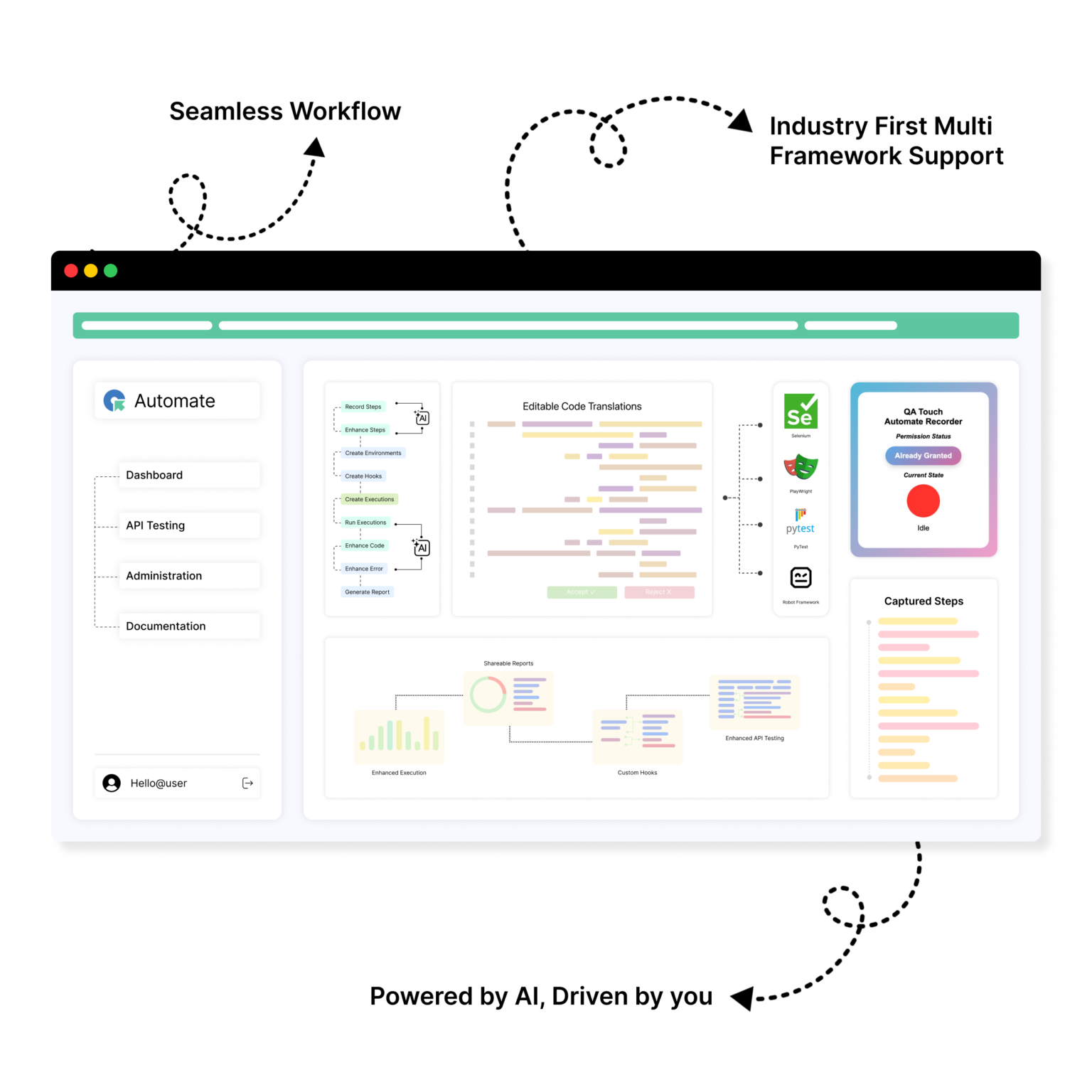
We help teams go from testing to AI powered test automation instantly. Record a test, let AI generate code in Playwright, Selenium, or Robot. Testers review and refine.QA Touch Automate makes automation a part of their daily work and will help as an Ally.
Our Test Automation Platform Features That Support Your QA Journey
reduce manual work, and improve release quality.
Element Detection
AI Execution
Step Improvement
API Testing
Roles & Permissions
Organization
Custom Hooks
Framework Support
User Experience
Execution Logs
Simple Plans, Real Value
Save upto 20%
Essential
$0 Free Forever
- 1 User
- 1 Project
- 10 Test Scripts
- 5 Saved API Tests
- 50 Monthly Executions
- 10 AI Script Improvements
- 10 AI Code Improvements
Essential
$0 Free Forever
- 1 User
- 1 Project
- 10 Test Scripts
- 5 Saved API Tests
- 50 Monthly Executions
- 10 AI Script Improvements
- 10 AI Code Improvements
Compare What Matters. See the Difference
| Feature | QA Touch Automate | Other Tools |
|---|---|---|
| Smart Element Detection | ✅ Advanced Extension: Captures stable, resilient locators directly from Chrome to build scripts instantly. | ✅ Standard: Most have recorders, but often output proprietary formats that are hard to export. |
| AI Executions (Local & Cloud) | ✅ Hybrid Power: Run tests on secure QA Touch cloud nodes or your own local agent with AI self-healing active. | ✅ Cloud Focused: Strong cloud grids, but local agent synchronization can be complex or restricted. |
| AI Test Step Improvement | ✅ Logic Optimization: Goes beyond fixing links; it analyzes test logic to suggest faster, more efficient ways to execute steps. | ❌ Self-Healing Only: Most tools only fix "broken locators" and don't suggest improvements to the test flow itself. |
| Smart AI API Testing | ✅ Intelligent Validation: Automatically generates test data and verifies API schemas using AI patterns. | ⚠️ Manual Focus: API testing in other tools is largely manual and lacks AI-driven payload generation. |
| Roles & Permissions | ✅ Enterprise-Grade: Granular, easy-to-manage permissions for teams, managers, and stakeholders. | ✅ Standard: Available, though often buried in complex "Settings" menus that are less intuitive. |
| Smart Bookkeeping | ✅ Integrated TMS: The only tool with "Smart Sections" that organize test scripts like a library within a management system. | ❌ File Folders Only: Competitors use simple folder structures, which become messy and unmanageable at scale. |
| Custom Hooks (Before/After) | ✅ Full Control: Advanced users can inject custom logic (Setup/Teardown) for precise environment handling. | ⚠️ Restricted: Many "no-code" tools hide these settings to keep the UI simple, limiting power users. |
| Native Framework Support | ✅ Open Ecosystem: Native support for Robot Framework, Java Selenium, Pytest, and Playwright. | ❌ Vendor Lock-in: Most force you to use their proprietary language/engine. If you leave, you lose your scripts. |
| Beginner vs. Advanced UX | ✅ Dual-Path: Clean enough for beginners to record tests, yet powerful enough for pro-coders to edit raw scripts. | ⚠️ Narrow Focus: Usually lean too far into "No-code only" or require heavy coding, leaving no middle ground. |
| Smart Execution Logs | ✅ Traceable Reports: Visual logs that link directly back to your project requirements and bug reports. | ✅ Basic Reporting: Good visuals, but often lack the direct link to a built-in Test Management System. |
Frequently asked questions
Everything you need to know about the product and billing
What is a no-code / low-code test automation tool?
A no-code or low-code test automation tool helps testers create automated tests quickly without writing complex scripts. You can start recording and add custom logic only when needed. QA Touch Automate is built to support both beginners and experienced testers in the same workflow.