
Testers, developers, and tech enthusiasts! If you’ve ever found yourself drowning in endless spreadsheets or juggling scattered test cases, I feel you. Managing test cases can quickly become a tangled mess especially when projects get complex and timelines tighten. fresh breeze blowing through quality assurance: free AI-powered test case management tools.
What Is a Free AI Test Case Management Tool?
At its core, a test case management tool helps teams organise and track the creation, execution, and results of test cases. It’s the backbone that keeps testing workflows clean and efficient no more wondering if your latest bug fix passed all its tests or which scenarios still need coverage.
Many of these modern tools use artificial intelligence to assist with tasks like generating test cases based on requirements, predicting risk areas, or even prioritising test runs.
Free AI test case management tools lower the barrier of entry, making advanced testing capabilities accessible.
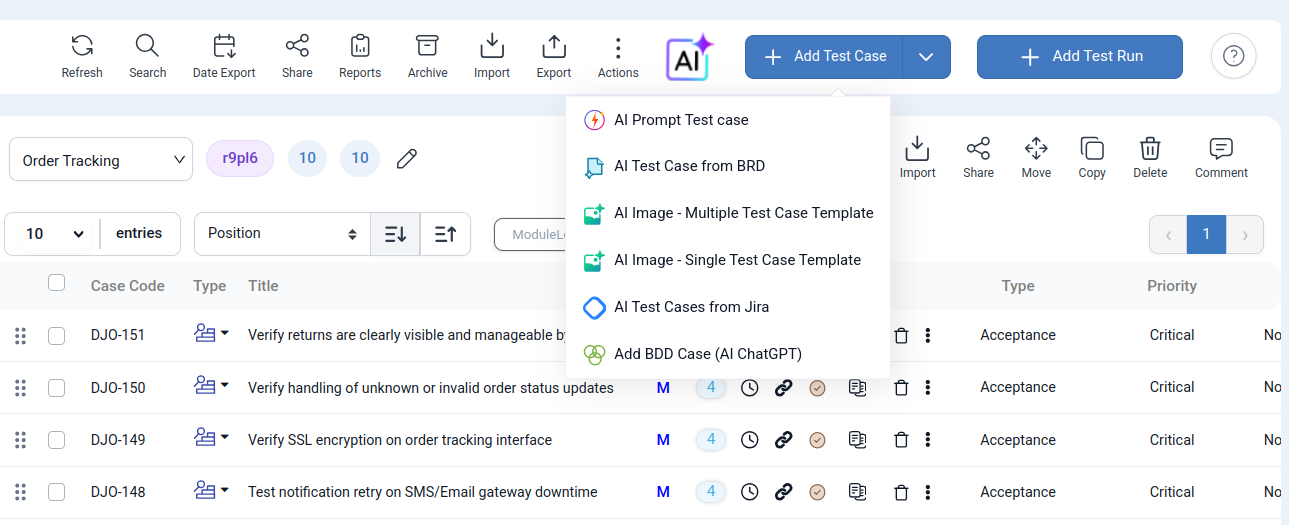
To maintain high quality in a rapidly moving development world, testing teams are turning to AI-powered test case generation. This breakthrough technology can interpret requirements directly from your visual assets. Testers simply provide Figma design mockups or any relevant image and a simple prompt to generate complete, actionable test cases within seconds. This innovation drastically reduces the time spent on manual documentation, enhancing test coverage and allowing QA professionals to dedicate their focus to complex problem-solving and quality strategy.
- Prompt to Test Case: Turn a short requirement into a clear and detailed test case.
- Figma/Screenshot Image to Test Case: Generate a full test suite straight from a Figma design or image.
- JIRA Stories to Test Case: Create coverage automatically from your existing JIRA stories.
- BDD Scripting: Let the AI produce well structured test case descriptions and BDD scripts instantly.
- AI Test Case Generate based on Business Requirement Document format :Generate test cases instantly by analyzing your Business Requirement Document (BRD). Significantly accelerate test preparation and ensure comprehensive coverage.
What Is AI Prompt Test Case Generation in QA Touch?
AI prompt test case generation is all about using artificial intelligence to create test cases automatically from a simple prompt or description Imagine you have a new feature or user story documented. Instead of manually outlining every single test scenario, you provide a brief input with a few sentences describing the functionality AI helps draft relevant test cases that cover different scenarios. feature is designed to make life easier by reducing the repetitive and time-consuming work of test case creation. It leverages natural language processing to understand your prompts and generate structured, actionable test cases.
Example Prompt
Create Style Feature Description
Users can create a new style with various categories, color, and size combinations.
The following fields and functionalities are available:
Style Name: Text input for entering the style name.
PO Number: Text input for entering the purchase order number.
Category: Dropdown list allowing the user to select a category.
Color & Size: Users can select multiple color and size options or create new ones as needed.
After filling in the details, the user can click “Create Style” to save the new style.
Additionally, there is a “Copy Style” option that allows users to duplicate an existing style.
When copying a style, ensure that the Style Name and PO Number are unique and do not match any existing records.
We all know testing can become a bottleneck, especially in agile environments where features roll out fast and furiously. The traditional grind of crafting test cases eats up precious hours and sometimes even leads to gaps or overlapping coverage. AI prompt generation offers a smart workaround: it accelerates test creation without cutting corners.
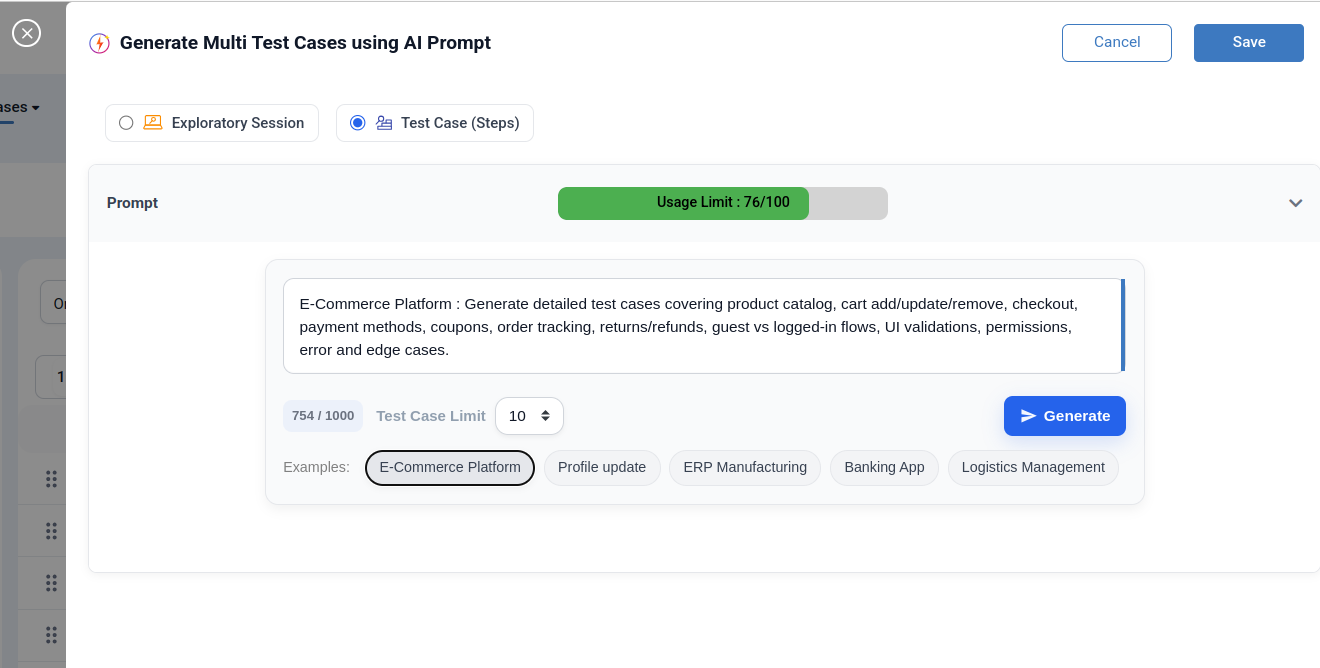
According to the prompt, we can offer the option to choose 5, 10, or 20 test cases, generated within seconds.
What Is Figma Mockup / Screenshot to Test Case in QA Touch?
QA engineers can now simply upload any image whether it’s a UI screenshot, a workflow diagram, or a simple form mockup and QA Touch will automatically transform that static visual into a list of structured, executable test cases requirements often start as visuals: wireframes, mockups, or quick screenshots. Testers frequently spend hours manually analyzing every button, field, and workflow in a screen image just to draft their initial test cases.
AI-driven test case generation from images solves this massive time sink by:
Smart Recognition: Instantly identifying every key element on the screen: buttons, input fields, dropdowns, and potential actions.
Scenario Suggestion: Automatically suggesting positive, negative, and edge-case scenarios based on the recognized elements.
Instant Structure: Delivering a complete, organized set of test cases instantly, ready for quick execution.
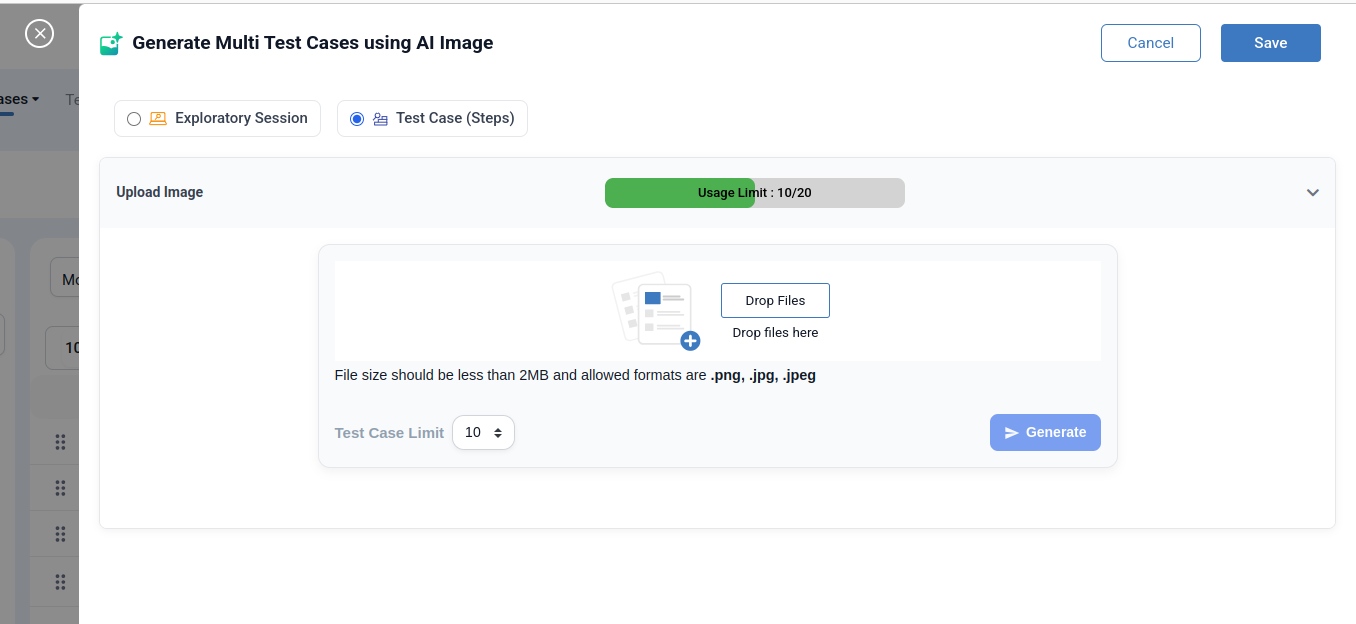
Multi Test Case Generate Template
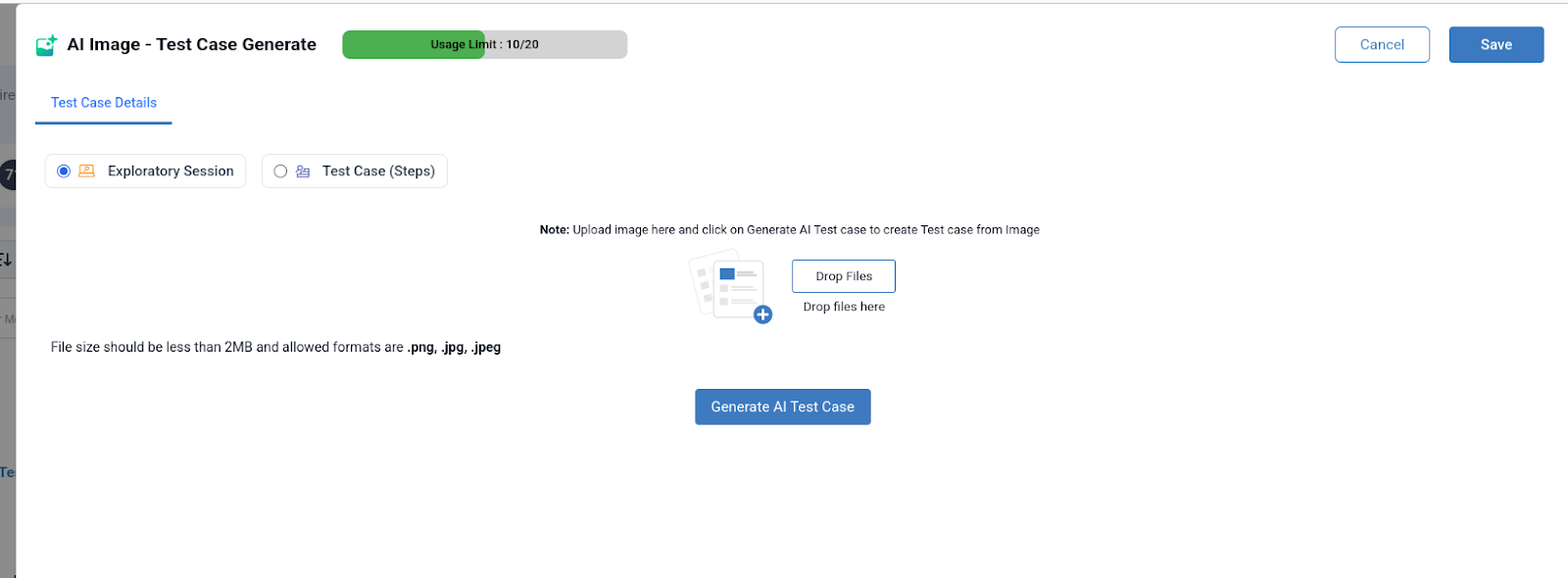
Single Test Case Generate Template
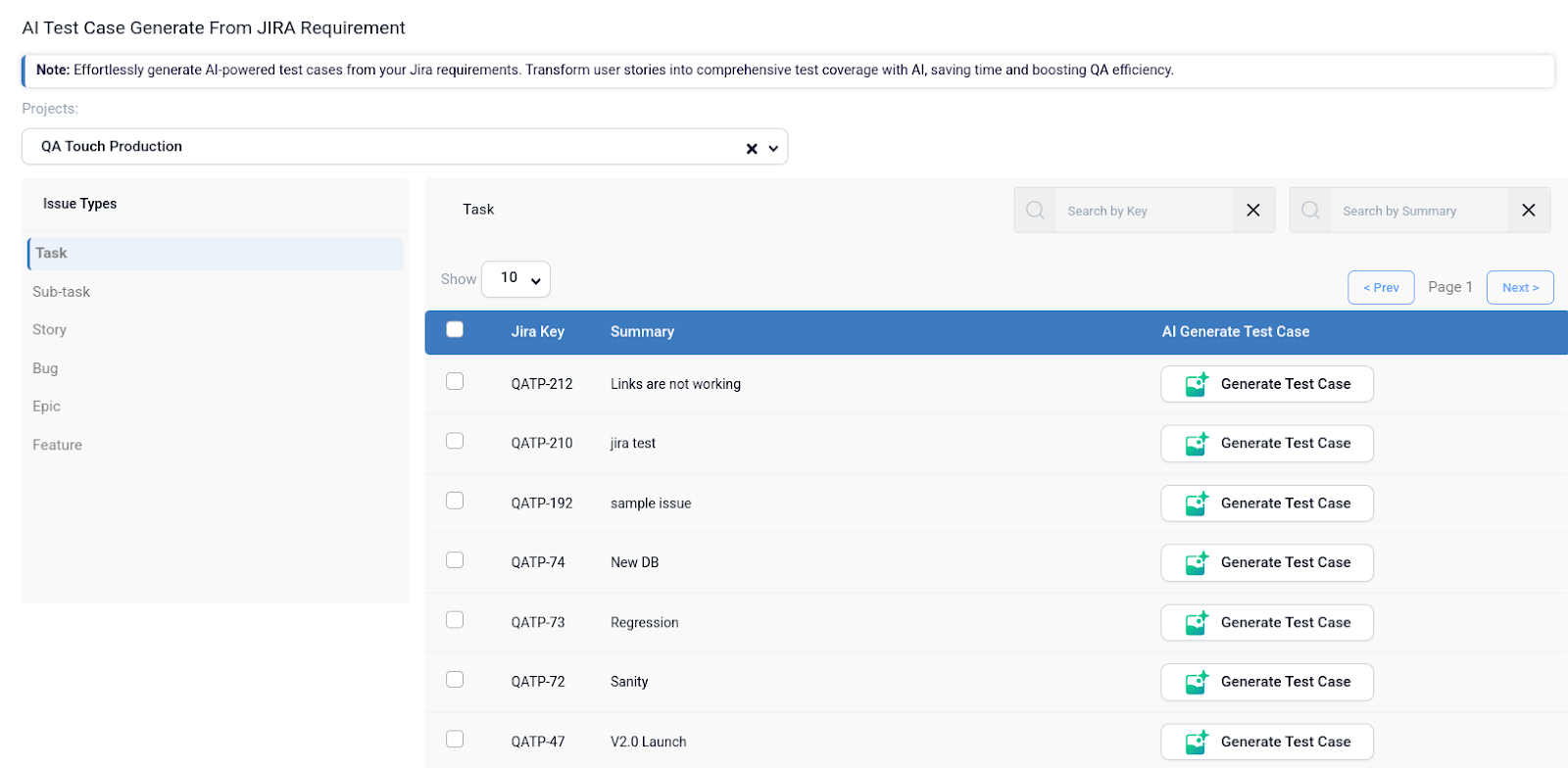
JIRA Stories to generate Test Case in QA Touch?

- Click the AI Test Case From JIRA menu
- In the pop-up, map the relevant JIRA requirements by selecting the corresponding checkboxes. This allows you to track coverage via RTM and Export → JIRA RTM on the Requirements page.
- From the dropdown, select the appropriate JIRA Project.
- The JIRA Bug Types will appear in the sidebar.
- Choose either the “Epic” or “Story” bug type to view a list of related JIRA requirements, displayed with three columns: JIRA Key, Summary, and AI Generate Test Case.
- Click the “AI Generate Test Case” button for the desired item.
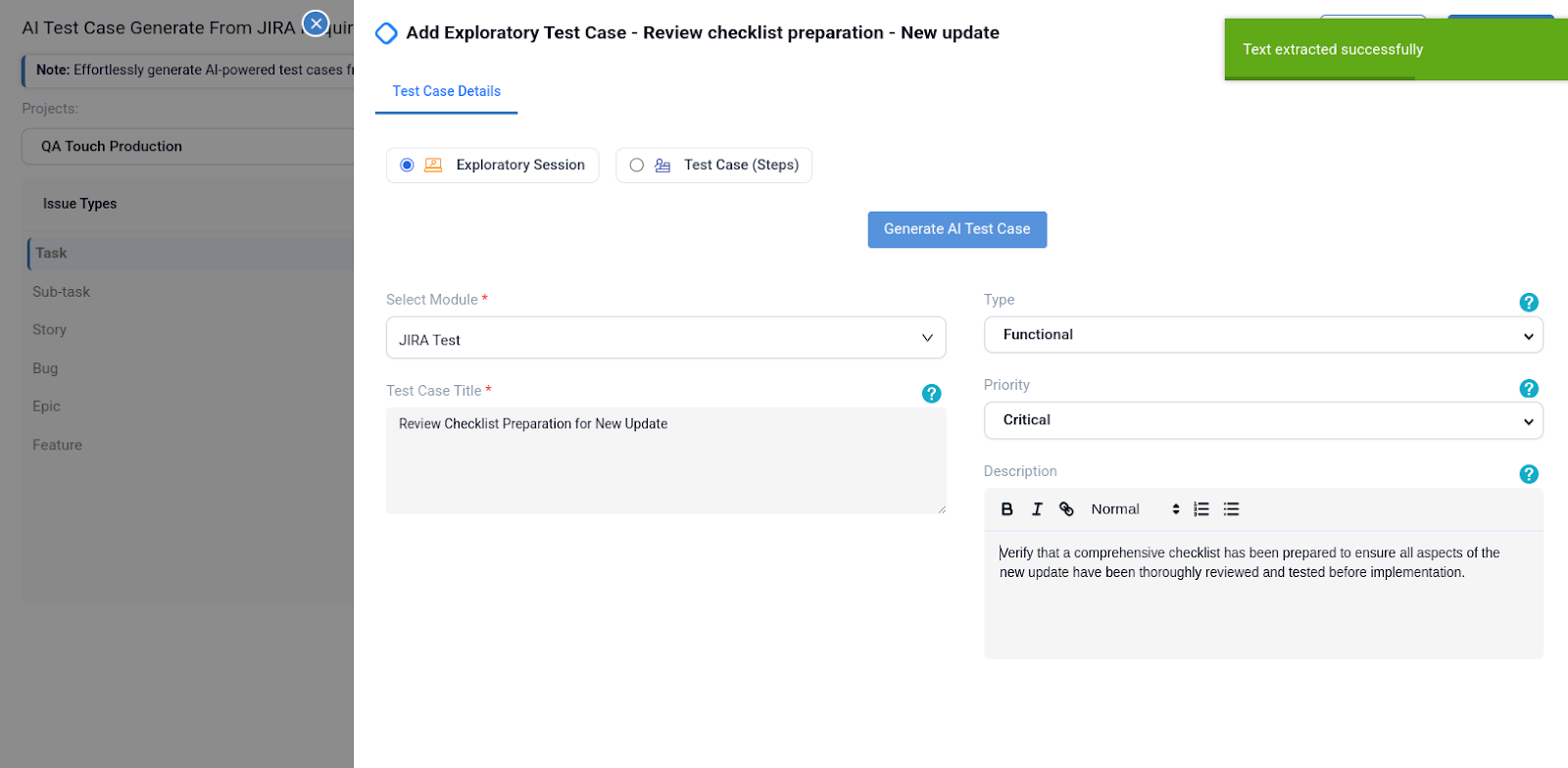
- A new pop-up will appear. From the dropdown, select a template: either Exploratory Session or Test Case Steps.
- Choose the “Test Case Steps” template.
- Click the “Generate AI Test Cases” button.
- The Test Case Title and Description fields will be auto-populated.
- In the Steps tab, the step items will also be filled in automatically.
- Select the relevant Module from the dropdown.
- Finally, click the Save button to store the generated test case.
- Your test case will be saved successfully.
Real-Time Reporting: Create integration reports that illustrate the connection between JIRA issues and test cases.
Create/Link Issues: In QA Touch, raise JIRA problems straight from a failed test case, automatically attaching pertinent information.
View and monitor end-to-end coverage from requirement to test case to execution result with Enhanced Traceability (RTM).
AI Behavior-Driven Development Scripting Framework
Behavior-Driven Development with QA Touch BDD is supported by QA Touch, a test management tool. It makes it simpler for non-technical team members to comprehend the project’s test cases by allowing you to import BDD scripts and create reusable steps. The Gherkin-based scenarios (Given, When, Then) are created automatically as a result. To guarantee efficiency and consistency, create and manage reusable BDD scripts in QA Touch.
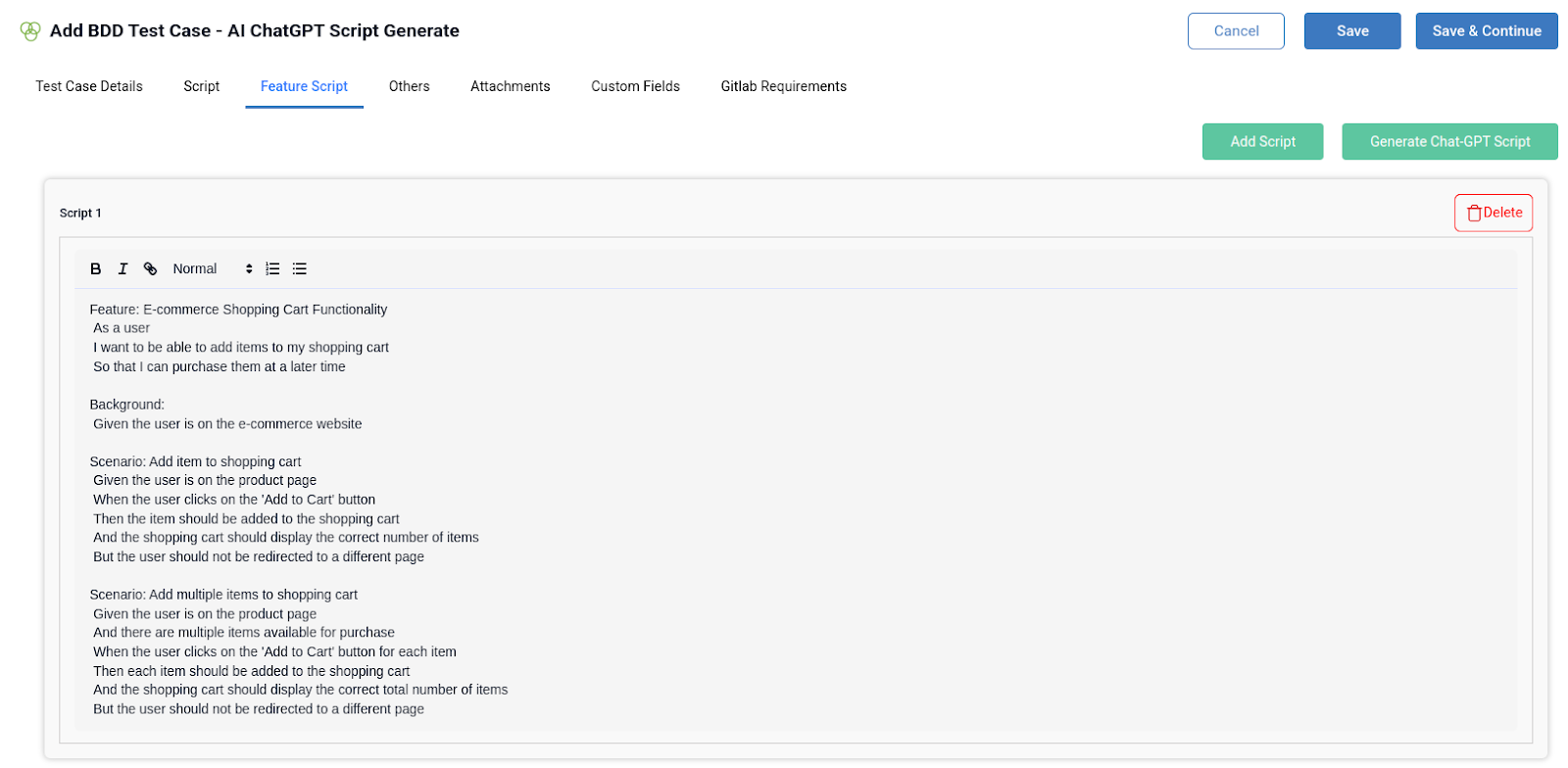
AI Test Case Generate based on Business Requirement Document
We can upload your BRD in PDF or DOC format using QA Touch’s new AI feature, and our intelligence engine will instantly produce a comprehensive list of actionable test cases after analysing the content.
Test case creation from BRDs has historically required extensive reading sessions, meticulous interpretation, and manual documentation. This procedure is made extremely easy with QA Touch:
- Visit the Test Case List.
- Select the AI Test Case Management option.
- Choose the AI Test Case from the Business Requirements Document (BRD).
- Upload your BRD in DOCX, DOC, or PDF format.
- Select the number of test cases 5, 10 ,20 you wish to generate
- Click “Generate”
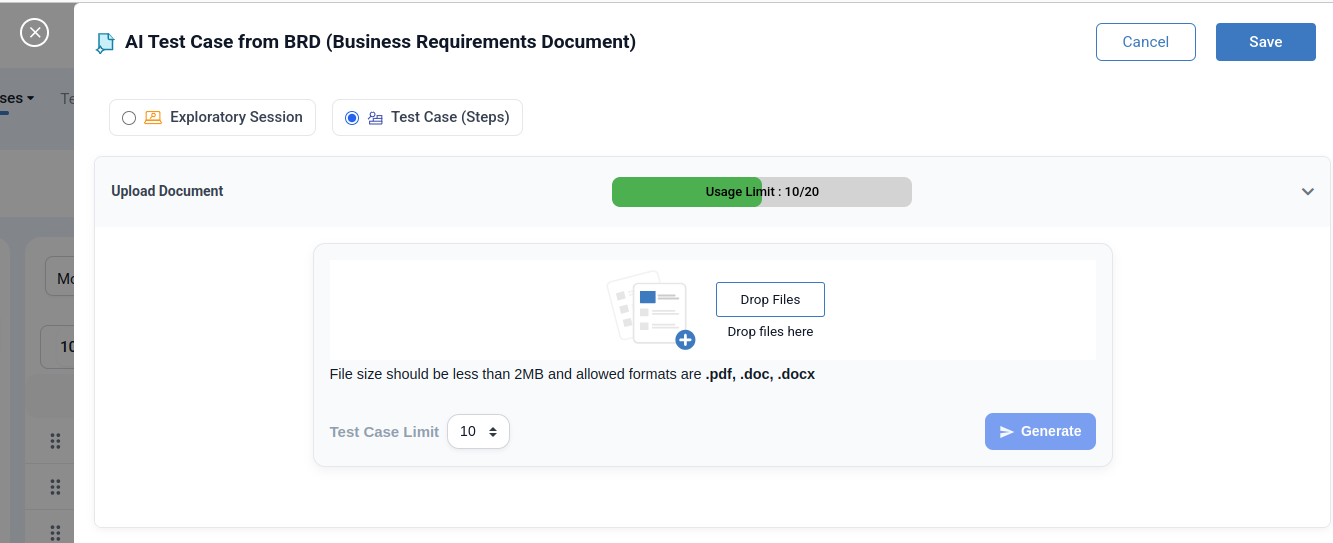

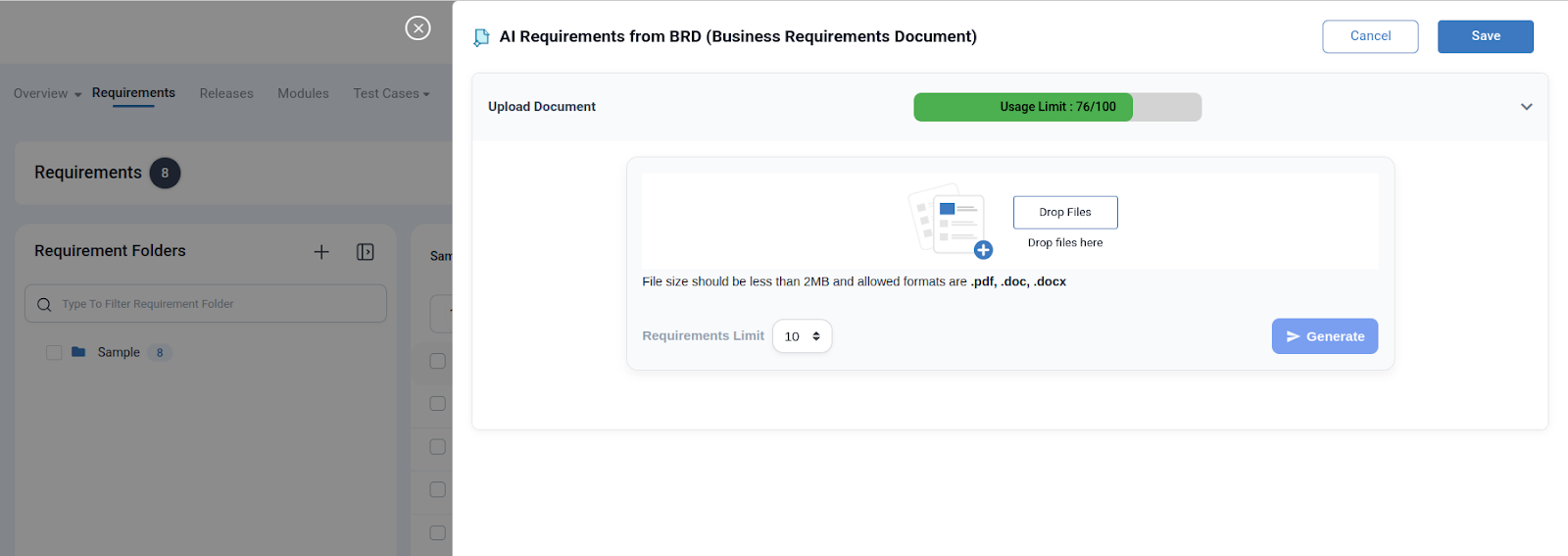
The requirements document is analysed in a matter of seconds by QA Touch, which then transforms it into a clean, organised set of test cases that are ready for use.
QA Touch is still committed to providing QA professionals with faster, more intelligent, and more user-friendly solutions. A seamless and effective testing experience is ensured by the AI BRD-to-Test Case Generator’s integration with your current workflows.
Testing teams are using Free AI-powered test case generation to maintain high quality in a world of development that moves quickly. Your visual assets can be used to directly interpret requirements thanks to this innovative technology. To create comprehensive, actionable test cases in a matter of seconds, testers only need to supply Figma design mockups or any pertinent image along with a straightforward prompt. This invention significantly cuts down on the amount of time spent on manual documentation, improving test coverage and freeing up QA specialists to concentrate on intricate problem-solving and quality strategy.